Self-Ordering Kiosks for Restaurants and Cafés in Riyadh
Kiosks shorten queues and often lift order values. What restaurants in Riyadh should plan before installing them.

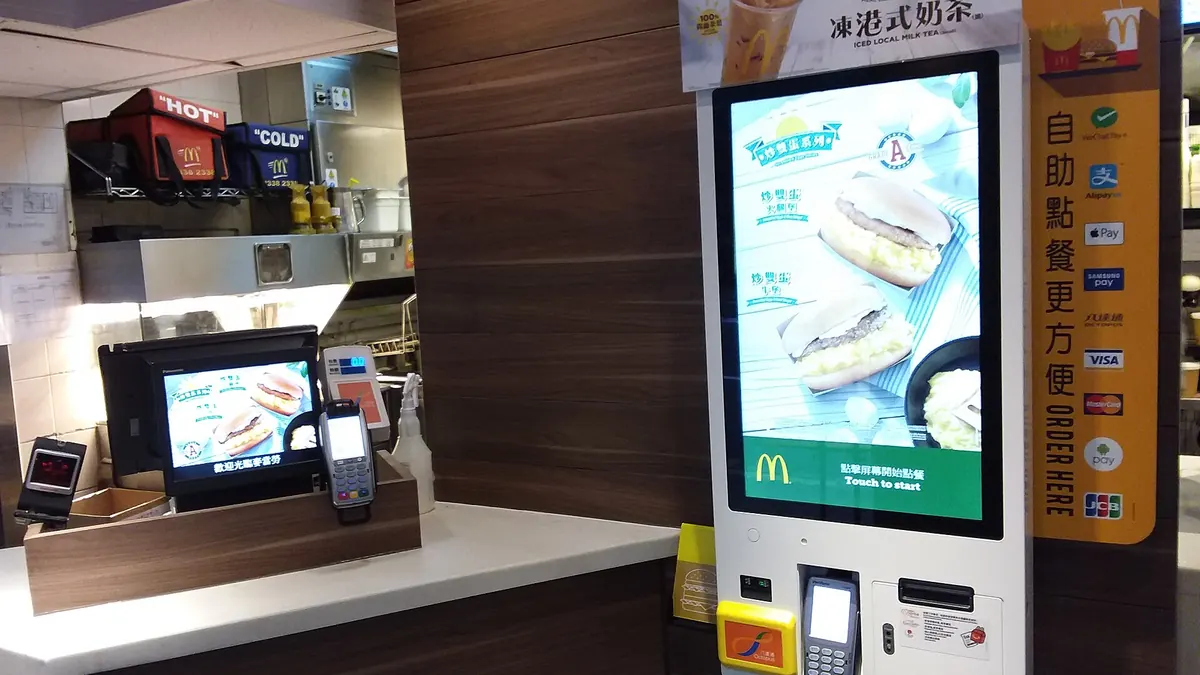
Walk into a busy quick-service restaurant in a Riyadh mall at 9 pm and you'll understand why self-ordering kiosks are spreading. Customers browse the menu at their own pace, customise their orders, pay by mada or phone, and the order goes straight to the kitchen.
For restaurants, kiosks mean shorter queues, fewer order errors and, very often, larger orders, because the screen suggests extras every time, consistently. Here's what to know before you install them.
Key takeaways
- Kiosks reduce queues and order errors, and consistent upselling can raise average order value.
- Integration with POS and kitchen display is essential.
- Design the menu for touch: big photos, few steps, Arabic and English.
- Choose robust hardware rated for all-day use and certified mada payment.
- Keep at least one staffed counter for customers who prefer it.
Why restaurants use self-ordering kiosks
- Shorter queues at peak hours, especially in mall food courts.
- Accurate orders, customers enter exactly what they want.
- Consistent upselling, combos, sizes and add-ons offered on every order.
- Staff redeployment, move people from the till to food preparation and service.
- Data, see which items, combos and times perform best.
Kiosk hardware options
| Type | Best for |
|---|---|
| Floor-standing kiosk | Restaurant entrances and food courts |
| Wall-mounted kiosk | Smaller sites with limited floor space |
| Countertop kiosk | Cafés and small counters |
| Outdoor / drive-thru kiosk | Drive-thru lanes (needs high brightness and heat protection) |
Each kiosk usually includes a commercial-grade touchscreen, a mada-certified payment terminal, a receipt printer and often a 2D scanner for loyalty QR codes and vouchers. See our self-service kiosks page for models.
Software and integration
- POS integration so orders, payments and menu prices stay in sync.
- Kitchen display system (KDS) so orders reach the kitchen immediately.
- Order status screens that show when an order is ready.
- Loyalty and promotions through QR codes or phone numbers.
- E-invoicing, each receipt must be issued through your ZATCA-compliant system.
- Remote management to update menus and prices across all branches.
Practical tips for Riyadh restaurants
- Place kiosks where queues naturally form, without blocking the entrance.
- Plan for peaks after Maghrib and Isha prayers and on weekends.
- For drive-thru and outdoor kiosks, choose high-brightness screens and cooling for summer heat.
- Have staff guide customers during the first weeks.
- Agree local support and spare parts so a broken kiosk is fixed the same day.
Making kiosks easy for every customer
- Height and reach: make sure at least one kiosk can be used comfortably from a wheelchair or by children.
- Readable text: large fonts, strong contrast, and prices that are easy to see.
- Simple language: short labels in Arabic and English; avoid jargon.
- Help nearby: keep a staffed counter and a team member who can assist at peak times.
- Hygiene: clean screens regularly; antimicrobial screen coatings are available.
Measuring kiosk ROI
| Metric | What to compare |
|---|---|
| Average order value | Kiosk orders vs counter orders |
| Kiosk adoption | Share of orders placed at kiosks |
| Queue and wait time | Before vs after installation at peak hours |
| Order accuracy | Complaints and remakes per 1,000 orders |
| Uptime | Hours each kiosk was available vs out of service |
Run the comparison for at least a month so weekends, paydays and seasonal peaks such as Ramadan are fairly represented.
Beyond restaurants
The same kiosk technology works for hospital check-in, cinema tickets, government service centres, price checkers in retail, and self-checkout in supermarkets. Read our self-checkout guide for retail.
Frequently asked questions
How much does a self-ordering kiosk cost?
It depends on the type (countertop, wall or floor), screen size, payment and printer components, and software licences. Ask for a quote based on your number of sites and integration needs.
Do kiosks accept mada?
Yes, when fitted with a mada-certified payment terminal. They can also accept credit cards, contactless and mobile wallets.
Can kiosks show the menu in Arabic?
Yes. Kiosk software should support Arabic and English, with right-to-left layouts for Arabic.
Do kiosks work with my POS?
Most kiosk software integrates with major POS systems. Confirm integration before buying.
Do you install kiosks in Riyadh?
Yes. I help restaurants and retailers in Riyadh choose, integrate and install self-service kiosks, with local support.